

How to Apply
November 7, 2026 Market Registration
Sign ups for the next market only. We do not accept registration for future markets.
-
OPENS
- WEDNESDAY, October 7
- Market applications accepted starting the Wednesday after the last market. Apply through Marketspread (https://marketspread.com/), apply early to receive your requested space. Payment is required after space assignment.
-
CLOSES
- MONDAY, November 2
- Sign up closes the Monday before the market.
-
PAYMENT
- Pay by the 20th of the month to avoid admin fee for late pay of $15. Payments can be made until November 2 only, last payment accepted.
- All payments must be received before the Wednesday prior to market day to attend. There is a late payment/admin fee of $15 for payments after the 20th unless paid on own by credit card through Marketspread.
- Self selected space then pay by credit card. Go to your Dashboard in Marketspread then to application and select the upcoming market.
- Please pay by credit card. We are still accepting payment by checks or money orders by exception. See our fees tab on our home page for payment information. Make payable to DASG Flea Market with your business name and space number, if applicable.
Book a Booth
Instructions for New Applicants - See below.
After you are an approved vendor go to Marketspread Learning Center "Booking a Booth as a Vendor" to book your space and pay your fee - (select date for next market) - Apply - Day - Select Space on Map - Pay. Debit and Credit Card Payments are accepted via Marketspread; select a space and make a payment.
No Refunds
Sorry there are no refunds or transfers
Please make sure you can attend the market prior to paying for your booth space. And check the dollar amount prior to confirming payment.
All revenue from our flea market is generated for our students at De Anza College. We appreciate your support!
Instructions - Returning Vendors
-
Login
Login to Marketspread with your username and password.
-
Select Market Date
If a colored box with the next De Anza Market date appears, click on the box for the current market date then click on the blue Apply Here button on the right hand of your screen, you will see a calendar date lightly grayed, select this date and when it turns blue, hit submit. Your application is on file, you will not be asked to re-apply.
Hint: If you do not see a colored box with the date for the De Anza Market, do a search at the top of your screen for Events or Market and type in DASG or De Anza. Then go through the steps above.
-
Book A Booth
Follow the instructions in Marketspread to book your own space and pay.
Instructions - New Applicants
Below we have an instructional video available to assist you.
-
Step 1
REQUIRED TO APPLY:
- DRIVERS LICENSE
- EMAIL ADDRESS: If you do not currently have an email address there are many free options available including, but not limited to:
4. PASSWORD - Must be at least 8 characters. You can use letters and numbers. Do not use special characters.
Hint: Make sure to write down your username and password for future Marketspread login.
-
Step 2
Upload to Computer: For easier application process upload prior to applying.
-
- Logo or photo of business (Optional)
- Photo of self or designee (Optional)
- Seller's Permit, if applicable. Required for all businesses/new items sales. (Please see the Seller's Permit section on the Vendors page for more information.)
-
-
Step 3
Sign Up for Account on Marketspread.com. Select Blue "vend, exhibit or sell online"
-
Step 4
a. New users, click on blue apply below to register with Marketspread.
b. If this is your first time applying through Marketspread you will first need to select the black Register button
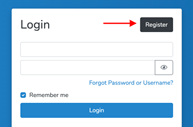
c. Returning users, if you already have a Marketspread account, Login by entering your username and password and continue the application process.
-
Step 5
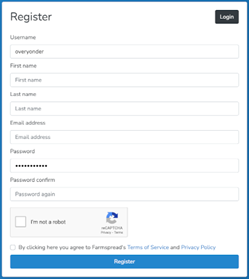
Then, fill in the form to create your new account profile page. Business name can be a fictitious name that describes the items that you sell or your name so that shoppers can find you.
-
Step 6
First Time Users Profile Information
-
- Enter basic business profile (select vendor not exhibitor).
- Required Fields - must be completed
- Optional Fields - Allow you to add a logo or other image that represents your business and a photo of yourself or designee. Try to add as much optional fields as possible.
- When you are done entering your information click on the Save & Create button.
- Enter basic business profile (select vendor not exhibitor).
-
-
Step 7
Once you have created your business profile you will be taken to the application for the De Anza College DASG Flea Market.
Apply for De Anza College DASG Flea Market
- Begin your application. Most common Vendor Types - Material Goods/Craft /Flea/Art or Farmer/Dealer for plant sales.
- No food or beverage vendors are allowed except food trucks who've contracted with us. We are not operating as a certified Farmers Market.
- After successful completion of your application, you will receive an email that your application has been received.
- The next step is for our administrator to approve your application. This may take 2-4 days depending on business volume. Once approved, you will receive an email that your application has been approved.
- Then you will be directed to select your booth and to pay for it. Once your payment is received, you will receive a message/receipt and/or QR code with your space number(s). Please be prepared to show your QR code or confirmation message/receipt on your phone or in printed format at the gate on the day of the market.